


PingMe - Second Phone Number
3.3618.00 Reviews
App Specs
- Version
- 26071710
- Updated On
- License
- Free
- Downloads
- 1,000,000+
- Developer
- PingMe
- Categories
- Communication
- Platform
- Android
Screenshots
 Analysis by AppCompare
Ever found yourself juggling multiple phone numbers for various reasons? Well, you're not alone! I've recently dived into the world of PingMe - Second Phone Number, an app that promises to simplify this chaos. Let me take you through my experience with it.
Where a second number fits into the routine
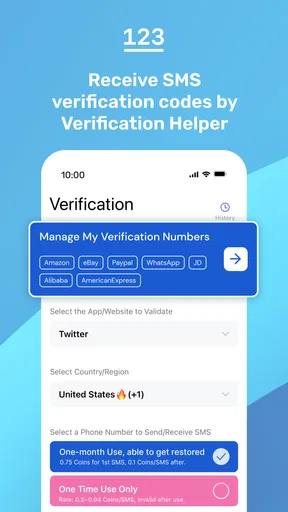
The first thing I’d decide is what job I want the extra number to do. PingMe is a communication app from PingMe, and its clearest use is receiving one-time passwords and SMS verification codes on a US number. That makes it a practical option when a service asks for a number and I would rather not hand over my everyday line. It is not a substitute for every kind of phone service, so I would start with one specific account or task instead of assuming it can replace my regular number.
A realistic routine might be signing up for a service on a personal phone, choosing the PingMe number where the service allows it, and then checking the app when the verification message is expected. I would keep the relevant app open long enough to copy the code carefully, enter it before the sign-in screen expires, and confirm the account is working before putting the phone away. If a code does not arrive, I would check the number and country requirements first, then use the service’s resend option rather than repeatedly requesting new codes.
This deliberate approach matters because verification systems do not all treat numbers alike. Some may accept a number while others may reject it, and a temporary delay can come from the service sending the message rather than from the phone app. I would not use a second-number app as the sole recovery method for an account that matters deeply to me. For banking, work access, or an account holding important files, I would also set up the recovery methods offered by that service and keep them somewhere safe.
Choose the use case before choosing the number
Before relying on a number, I would ask whether I need it for a one-time sign-up, ongoing messages, or conversations that people may need to reach me about later. Those are different needs. A number used briefly for a code is easier to manage than one attached to important contacts and account recovery. If I expect ongoing access, I would check how the app handles the number and any related costs before building a routine around it.
That makes PingMe most appealing to people who want a separate line for verification or a clear boundary between a specific online activity and their personal number. It may also suit someone who changes devices often but still wants to keep their number use organized within an app. I would skip it if I needed guaranteed acceptance by every website, a replacement for my carrier line, or a dependable emergency contact number. In those situations, a conventional mobile plan or the service’s own authentication options are safer choices.
Getting Started with PingMe
First things first, downloading PingMe was a breeze. It's available on both Android and iOS, so no one misses out here. Once installed, the setup was straightforward. You just need to verify your primary number, and you’re in!
Worth Reading Before You Choose

Flipboard Shows What News Apps Must Do Beyond the Feed

Switching to Android Auto Means Rethinking Your Driving Routine

Google Calendar Makes a Crowded Week Easier to Manage

Ludo King Makes the Most of the Minutes Between Plans

Baby Panda World Brings Quick Play to Modern Phones, but Its Game Library Feels Busy

ESPN’s Live Game View Makes Following Close Games Easier
The app's interface is pretty intuitive, which is a big win in my book. The design is clean and minimalistic, making navigation a real cinch. I didn’t find myself lost in a sea of options, which is often the case with similar apps.
Features That Stand Out
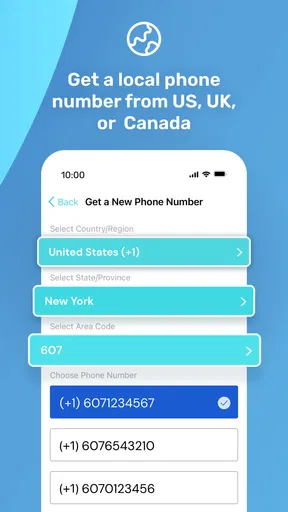
Now, let’s talk features. The app offers a range of second phone numbers from different countries. This is a game-changer if you need to manage international communications without breaking the bank.
- Multiple Numbers: You can have as many numbers as you need. Whether it's for business or personal use, PingMe has got you covered.
- Privacy: Your primary number remains hidden, which is perfect for those who value their privacy. The second number acts as a buffer, keeping your main line secure.
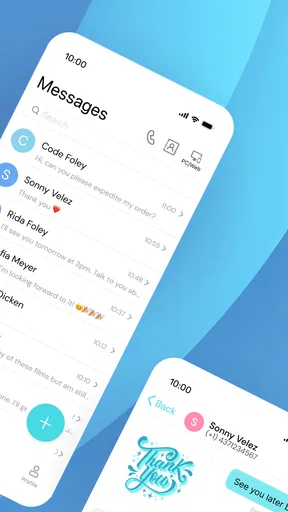
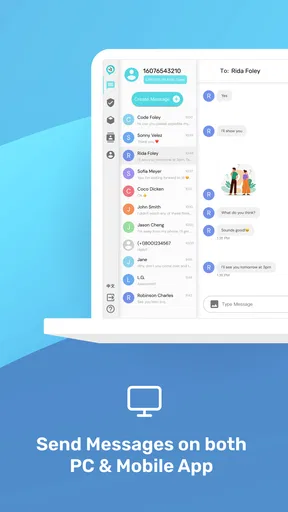
- Call and Text: You can make calls and send texts through the app. The quality? Top-notch. I didn't experience any noticeable lag or drop in quality during my test runs.
- Verification Codes: Need to verify accounts without using your main number? PingMe handles this seamlessly.
Using PingMe in Daily Life
So, how does PingMe hold up in real-world use? Pretty well, I must say. I used it to connect with clients and keep my personal number out of the loop. It was liberating to separate work and personal life without needing an extra phone.
I also tried the international number feature. I could communicate with friends abroad without worrying about exorbitant charges. The app even let me choose a local number from their country, which was a neat touch.
Building a repeatable verification habit
For a smoother workflow, I would keep a short private note of which services use the second number and why. That avoids the common mix-up of trying a verification code on the wrong line months later. I would not store passwords or active codes in that note; the point is simply to remember the account association. When a service offers an authenticator app, passkey, or backup codes, I would consider those alongside SMS rather than treating a phone number as the only route back in.
It also helps to separate “received a code” from “the account is secure.” A one-time message proves that a service could send a message to that number at that moment; it does not guarantee future access if the number changes or becomes unavailable. For any account I expect to keep, I would complete its recovery setup while I am already signed in. That small extra step can prevent a frustrating lockout later.
Settings and costs worth checking
My first check would be the exact number and country shown in the app before I share it with another service. A mismatch between the country expected by a website and the number selected can waste time, and changing the number midway through a sign-up can make it harder to tell where a delayed code should arrive. I would also review the app’s current account and purchase screens before depending on a number for ongoing use.
The app is free to install, but it includes in-app purchases ranging from $0.99 to $99.99 per item. I would treat that broad range as a reason to read each purchase description carefully, not as a promise that a particular feature or number costs a particular amount. If my need is a single verification, I would avoid buying anything until I understand what the app is asking me to pay for and whether the number will remain useful for the period I need.
PingMe has a 3.3 average from around 6,300 ratings, with about 606 written reviews, and more than a million installs. I take that as a cue to test it against my own use case instead of assuming every user’s experience will match mine. The app is rated for Everyone, first appeared on January 16, 2019, and its current version is 26021209; it requires Android 6.0 or later. These details make it accessible to many Android users, but they do not remove the need to check whether a particular service accepts the number.
Where it differs from ordinary alternatives
Compared with using my personal carrier number, a separate app number creates a boundary: I can reserve my main line for people and services I trust most, and use the second line for a narrower purpose. Compared with an authenticator app or passkey, however, SMS depends on the receiving number and the sending service. For accounts that support stronger or more convenient sign-in methods, I would use those rather than adding another SMS step simply because it is available.
A spare SIM or a second carrier line may be a better fit when I need broad compatibility, long-term control of a number, or dependable voice service. The trade-off is carrying and paying for another line, while an app-based option is easier to keep together with the phone I already use. For occasional verification, that convenience can be compelling; for a number tied to business continuity or account recovery, I would favor whichever option gives me the clearest ongoing access.
Subscription and Pricing
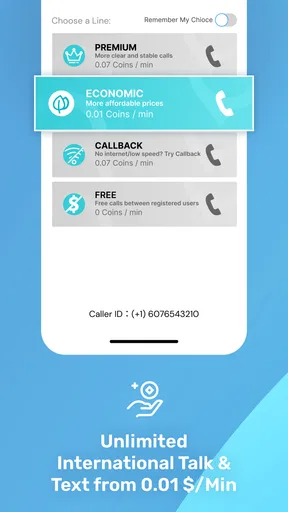
PingMe offers various subscription plans, which are quite flexible. You can choose between monthly or yearly options, depending on your needs. The pricing is competitive, especially when you consider the features on offer. Plus, they offer a free trial, so you can test the waters before diving in.
One thing to note is that while the app offers a lot for free, some features do require a subscription. But honestly, for the value it provides, it’s worth considering.
Advanced limits to keep in mind
I would not assume that every verification text will arrive just because the app can receive SMS. A website may restrict certain number types, and a code can be delayed or fail for reasons outside the app. My practical fallback would be to pause, check the number format and service instructions, request one resend, and then choose another verification method if available. Repeated requests can create confusion or trigger a service’s own limits, so patience is more useful than tapping resend over and over.
Privacy also has a boundary here. Using a second number can keep a personal number out of a particular sign-up, but it does not make an account anonymous, nor does it remove the need to follow the rules of the service receiving the number. I would avoid using it to misrepresent who I am or to bypass a platform’s safeguards. It is best viewed as a number-management tool, not a blanket privacy shield.
The app’s version and interface can change over time, so I would check the current purchase details and number options in the app before making a long-term plan. The Android minimum is version 6.0, which is useful to know if I am setting it up on an older device. For someone who only needs a one-off code, the simplest test is to try the intended service before moving multiple accounts over.
Final Thoughts
Overall, PingMe - Second Phone Number is a solid choice if you need to manage multiple numbers efficiently. It’s user-friendly, reliable, and packed with useful features. Whether you’re a business professional or someone looking to keep their private life private, this app has something for everyone.
If you’re tired of carrying around additional phones or simply want to streamline your communication, give PingMe a shot. It might just be the solution you’ve been searching for.
Ready to try it out? You can find PingMe on the App Store and Google Play. Happy dialing!
Who will get the most from it?
I would recommend trying PingMe when the goal is specific and modest: keeping a main number out of a low-stakes sign-up, separating a side project from personal contacts, or receiving a verification message while organizing accounts. It is less suitable as the only number attached to essential services, or for anyone who needs guaranteed access across every platform. That distinction is the difference between a handy extra layer and a risky point of failure.
My mastery verdict is practical rather than absolute: decide which accounts truly benefit from a second number, test one first, record the association safely, and set up a backup sign-in method wherever possible. PingMe can make number management feel tidier, especially when I use it with a consistent routine. I would still keep my primary line and stronger account-recovery tools for the situations where access matters most.
Pros
- Easy to set up additional numbers.
- Affordable pricing for multiple lines.
- Supports international calls and texts.
- Customizable voicemail greetings.
- Reliable call quality and connection.
Cons
- Limited free trial features.
- Occasional app crashes reported.
- Some features are region-restricted.
- Requires stable internet for best use.
- Ads can be intrusive in free version.
FAQs for PingMe - Second Phone Number
What is PingMe used for?
PingMe is an app that provides users with a second phone number. It's ideal for those who need to separate personal and business communications, enhance privacy, or use a temporary number for online activities. This functionality is particularly useful for travelers, freelancers, and individuals who need to manage multiple lines efficiently.
Is PingMe available on both Android and iOS?
Yes, PingMe is available for download on both Android and iOS platforms. Users can easily find it on the Google Play Store for Android devices and the Apple App Store for iOS devices. This cross-platform availability ensures that a wide range of users can take advantage of its features.
Are there any costs associated with using PingMe?
PingMe offers a variety of plans, including both free and paid options. While users can start with a free trial to explore basic features, premium plans provide additional benefits like more minutes, SMS capabilities, and international numbers. Pricing details are available in the app, allowing users to choose a plan that fits their needs.
How secure is the data on PingMe?
PingMe prioritizes user privacy and data security. The app employs encryption protocols to protect communications and personal information. Users can be assured that their conversations and data are kept confidential, making it a safe choice for managing additional phone numbers and ensuring privacy.
Can I use PingMe for international calls and messages?
Yes, PingMe supports international calls and messages, making it a convenient choice for users who need to communicate globally. The app offers competitive rates for international services, allowing users to stay connected with friends, family, or business contacts worldwide without incurring high costs.


